Ugh camera repair

So some of you probably remember my horror stories about this camera repair service (such as not fixing it the first time, not being open during their advertised hours causing me to waste a trip downtown, not having people on-hand to do repairs despite that being their name, losing my flash popup button such that I had to use a paperclip to pop it).

Turns out they left me with another present: When they fixed my camera, they set the time on it behind by 12 hours. This isn’t something I noticed before because I usually don’t use timestamps, and the time itself is right (it’s just the AM/PM part that’s wrong). Noticed this today while tagging photos because Photoshop Album (which is a rather terrible program in itself, but I digress) sorts photos by chronological timewise but reverse chronological for days (i.e. as you’re scrolling down, 12:01 midnight on January 2 appears before 11:59 PM on January 1, but 11:58 PM on January 1 also appears before 11:59 PM), so some days were being split up (because photos taken before vs after noon on that day were being reported as different days). So yeah, now I have to go and fix the timestamp on every photo from August 5, 2007 until today. Argh.

Don’t ever use this camera repair service. Seriously.

On the plus side, I have now tagged 104226 photos. Yay photos.
Moar Photoshoop da whooping

As before, click the images to make them bigger.

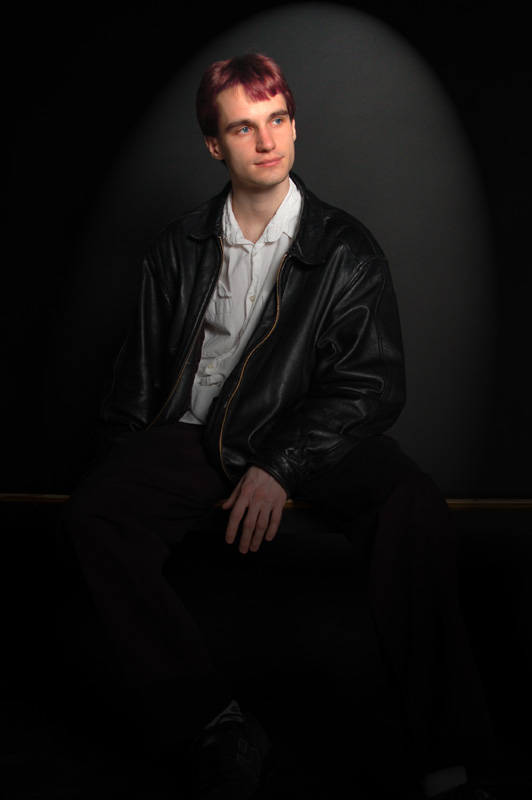
Ben:

Played around with lighting a little, desaturated his (annoying) shoes, pulled out his eyes, colorized his hair to burgundy.

Car:

Applied an outline filter to the entire image and erased out her skin, then erased with partial transparency for her clothes.

I should tag more photos or something. Maybe tomorrow.

More Photoshopping

Life has gotten craptchas, as per the comment thread on yesterday’s journal entry. They’re just text, and they’re totally optional anyway. Woo. Not linking life because it hasn’t gotten any significant updates.

The meme photos made me feel like working around more with Photoshop, so I did some of that today.

The goal in all of these wasn’t to significantly change the image but rather accentuate (and/or enhance) the subject.

Click any of the images. They get bigger (since I’m rather happy with the way some of them came out, and a 400px image doesn’t do them justice… then again the 800px versions again aren’t nearly as good as the 3000px originals, so iono).

Brewer:

Changed his shirt color to match his eyes, pulled out the color of his eyes some more, muted and mushed the background a bit (solarize, invert, various blurs).

Jayne:

Applied a slightly grainy filter to the background to dull it out, and also desaturated portions of it (because Em’s bright red hard drive was rather distracting). Jayne herself is untouched.


Applied some noise and grain filters to the blanket and desaturated Em’s (rather distracting) arm.

Mark:

This is one of my favorite portraits of him. Intensified his eye color. Slightly blurred and muted his shirt and camera, as well as the background. Also removed color from the background.

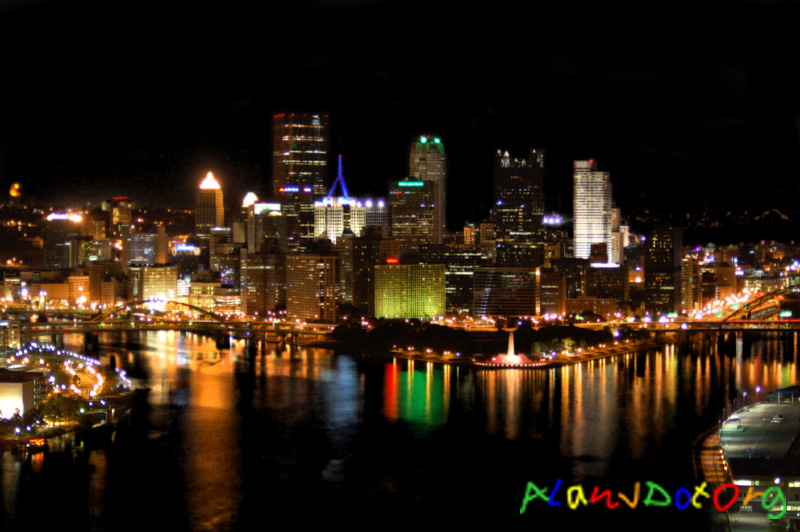
Pittsburgh Skyline:

I already loved this photo (the original basically looked like this), except the lightness of the sky somewhat bothered me. Greatly darkened both the sky and the water and drew out the reflected colors a little more (not much though, because they were already quite intense). The buildings themselves are untouched.

I may have to play around some more tomorrow. The walrus Toms are just begging to be played with. I don’t know how well it’ll work though, since all manipulated images thus far have been without the harsh lighting from a flash.

In other life things, Safeway had a huge sale on crap, so I bought some pop tarts, bread, and fruit snacks for $1/item. The cashier scanned the fruit snacks twice but forgot to scan the tomato, so I guess it all works out in the end. Then there was fresh guacamole (with the avocado I had left over from last week) and gin and tonics with Brewer, who came up to SF to return Em’s laptop.

Also, unrelatedly, I just upgraded the WordPress installation (wow, the admin center looks completely different). Let me know if you see any problems or have issues.

Meme images

Life has gotten another decently-sized update. CMU itself is tagged through the beginning of the 2007-2008 year, so one more semester and I will have all photos from where life currently ends to the present tagged. That will be awesome.
Also, the captcha is removed from commenting because Tim pointed out it was silly to have a password-protected site with captchas.

Here are the photos from the meme that I owed people. I wasn’t terribly happy with the way they came out, so I did a bit of photomanip to each one as well.

Greg:

I did more manipulation to this than may be initially obvious. I pulled out the colors of each of the flowers in different ways.

Zach:

I played around with colors a lot on this one because the shot itself was really boring.

Zeke:

The significance behind this one is more subtle. I really wanted to take photos of something music-related, but had no idea where in San Francisco this could happen. The manip on this one is the classic monochrome-of-background, but I like how it’s not glaringly obvious.

I will also email full-sized copies to each person.

Edit: New Year’s photos have been posted on photos 2. Today was a very photo-y day.
Also, om nom nom nom?

Photo Firsts (Dan and Mars)

Life has gotten another month of updates. (It might have more by tonight, depending on what I feel like doing today.) It also now has comment capabilities, since Jeff requested it.

My first photo of Dan from October 29, 2004:

This is from the SCS Halloween party.

My first photo of Mars from February 26, 2005:

This is from Matt’s birthday.

In both cases, I knew them before I had a photo of them (Dan from being Matt’s roommate and Mars from being Apphia’s roommate), which is extremely unusual for me.